


Video Private Downloader
4.224.00 Reviews
App Specs
- Version
- 1.0.7
- Updated On
- License
- Free
- Downloads
- 100,000+
- Developer
- O.A.DIAZ PROPERTIES LLC
- Categories
- Video Players & Editors
- Platform
- Android
Screenshots
 Analysis by AppCompare
I often want to keep a clip handy after finding it in a feed, but saving a video is not always as simple as tapping a button. Video Private Downloader is built around that practical job: bringing a video into an app where I can download and watch it later. Its focus on saving clips, rather than editing them, makes it most useful when I already know what I want to keep and would rather not hunt for it again.
A downloader with privacy at its center
The part that gives this app its clearest purpose is the private folder for downloaded videos. Saving a clip is one thing; deciding where it should live afterward is another. Keeping it inside a dedicated area can make sense for personal recordings or other videos I do not want sitting openly among everyday media. I would still treat that as a practical privacy layer, not a reason to store sensitive material without considering who can access the device.
The app is free and is rated for Everyone, which lowers the barrier to trying it. It comes from O.A.DIAZ PROPERTIES LLC, and its video-saving focus puts it among the tools people might compare with a browser’s built-in download option or a phone’s regular media library. Those alternatives can be simpler when a site already offers a legitimate download button; this app is more appealing when I want a separate place to handle a clip and keep it private.
Unpacking the Interface
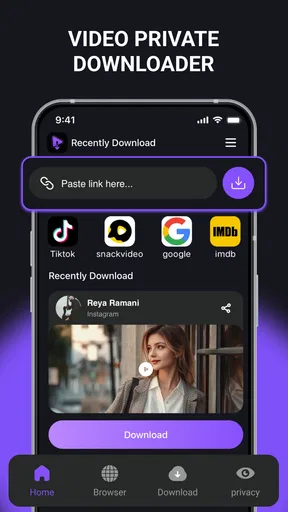
First things first, let's talk about the interface. The Video Private Downloader presents a clean and straightforward design. When you fire up the app, you’re greeted with a minimalistic home screen. No flashy distractions here, just a simple search bar and a few intuitive icons. It’s clear that the developers aimed to keep things user-friendly, even for those who aren’t particularly tech-savvy.
The navigation is a breeze. You can easily toggle between different platforms from which you want to download videos. Whether it’s Facebook, Instagram, or even some more obscure sites, you’ll find that switching between them is seamless.
Downloading Videos Like a Pro
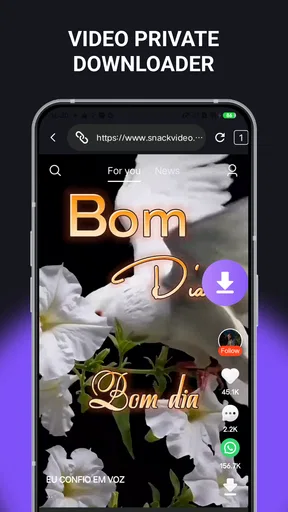
Now, onto the main event: downloading. This app lets you download videos in just a few taps. You can either paste the link directly into the app or, even better, use the built-in browser to navigate directly to the video. The latter option is especially handy if you’re browsing and suddenly find something worth saving.
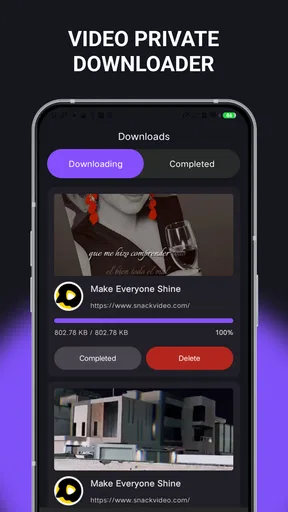
Once you’ve got the link, just hit the download button, choose your desired resolution, and voila! The video starts downloading right away. I was impressed by the download speed; it didn’t keep me waiting around. Plus, the app supports multiple downloads simultaneously, so you can stockpile videos without hassle.
Worth Reading Before You Choose

EA SPORTS FC Mobile 26 Is a Bigger Football Game, but It Takes Time

Flipboard Shows What News Apps Must Do Beyond the Feed

Switching to Android Auto Means Rethinking Your Driving Routine

Google Calendar Makes a Crowded Week Easier to Manage

Ludo King Makes the Most of the Minutes Between Plans

Baby Panda World Brings Quick Play to Modern Phones, but Its Game Library Feels Busy
Making a saved clip easier to use
A useful habit is to decide where a clip belongs before downloading a batch. If I am collecting a few videos for a trip, I can keep the task focused: find each clip, check the available resolution, and save only the versions I will actually watch. That avoids filling a private area with duplicates or oversized files. Since several downloads can run at once, I would start with a small queue and check that the results are right before adding more.
There is also a choice between using a link and browsing inside the app. I would use the browser when I am already looking at a video and want to avoid switching between apps to copy its address. Pasting a link is the more controlled route when I have already saved or received the exact URL. If a clip does not download, checking that the link points to the video itself rather than a general profile or feed is a sensible first step.
Keeping It Private
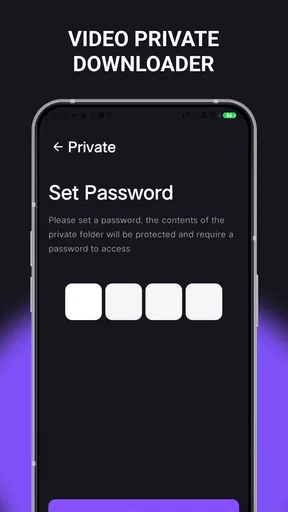
Privacy concerns are a big deal these days, and the app addresses this head-on. It offers a private folder feature where you can store your downloaded videos. This ensures that only you have access to them. Setting it up is a cinch—you just need to create a pin or use biometric security, depending on what your device supports.
I appreciated this feature because it adds an extra layer of security, especially if you’re downloading content you’d prefer to keep away from prying eyes.
Where the private folder helps—and where it does not
The private folder is most valuable when I want a little separation from the camera roll, not when I need a full media-management system. Before relying on it, I would set up the available lock and make sure I can comfortably unlock it on my own device. A PIN or biometric option can make casual access less likely, but it does not replace sensible device security or a backup plan for videos I cannot afford to lose.
It is also worth thinking about how I will find a clip later. A secure folder can become a pile just as easily as a public library can. Since I would not assume that a downloader automatically sorts everything in the way I prefer, a simple personal routine helps: download only what I intend to keep, watch it in the app, and remove anything I no longer need. That keeps the private space useful without turning it into an overflowing archive.
Extras and Features
Beyond downloading, the app offers some additional features that are worth mentioning. There’s a built-in video player, which means you can watch your videos directly within the app. This might not seem like a big deal, but it’s a nice touch, allowing you to preview videos or enjoy them without needing another app.
Additionally, there’s an option to convert videos into audio files. This feature is a game-changer if you’re looking to save that catchy song from a video clip or want to listen to podcasts offline.
Choosing the right tool for the job
Compared with a normal video player, this app makes more sense when the goal is to bring a clip into the app and watch it there; a player you already use may be the better choice if your videos are already saved and you mainly want playback. Compared with downloading directly from a platform, the app offers a distinct workflow, but it should not be treated as a way around a creator’s restrictions. I would use it only for material I have permission to save and keep.
The audio-conversion option may suit a clip where listening matters more than watching, such as a talk or a song shared in a video. I would not assume every clip is a good candidate: the source needs to contain audio worth keeping, and the resulting file is useful only if the app’s conversion works with that particular video. For music or podcasts, a service that provides authorized offline listening may be a better fit than extracting audio from a social clip.
Smooth Sailing or Rough Waters?
Overall, using the Video Private Downloader was a smooth experience. I didn’t encounter any major bugs or crashes, which is a big plus in my book. The app runs efficiently without hogging too much space or draining the battery.
One thing I’d love to see in future updates is a way to organize downloaded videos with tags or folders. While the private folder is great for security, some additional organizational tools would really make this app shine.
Compatibility-wise, the app works on both Android and iOS, making it accessible to a wide range of users. It’s refreshing to have an app that doesn’t compromise on features regardless of the platform.
Everyday use, with realistic expectations
Picture a train ride where the connection is unreliable and I want to watch a short clip later. I can open the video in the built-in browser or paste its link, choose a resolution that suits how I plan to watch, and let it download before leaving home. Once saved, the in-app player gives me a direct way to check that the clip is available. The useful detail is to test one video first: it confirms that the source and chosen workflow behave as expected before I depend on a longer queue for the journey.
That does not mean every online video is a guaranteed download. Sites can change how their pages work, and access may depend on the source and the content. When a link fails, I would try the app’s other route—pasting the video address if I started in the browser, or opening the page in the browser if I started with a copied link—rather than repeatedly tapping download. If neither works, the source may simply not suit this method.
For day-to-day housekeeping, I would also check the resolution choice against the screen and the purpose. A higher-resolution copy can be worthwhile when details matter, while a smaller option may be enough for casual viewing on a phone. The practical trade-off is storage: keeping several versions of the same clip can use space without adding much value. Choosing one version and removing failed or unwanted downloads is a more reliable routine than treating simultaneous downloads as an invitation to save everything.
Who will appreciate it most
I see the strongest fit for someone who regularly comes across videos they are allowed to save, wants a straightforward route from finding a clip to watching it, and values keeping selected downloads in a separate locked area. The app’s 4.2 average rating across around 160 ratings and its 100K-plus installs suggest that it has found an audience, though those figures do not tell me whether a particular site or video will work for an individual user. Its current version is 1.0.7, and it requires Android 8.0 or later on Android devices.
Someone who only watches streaming video, already downloads through the source platform, or needs a carefully organized library may be better served by the platform’s own options or a dedicated media player. The same goes for people who want dependable offline access to a whole catalog: a downloader aimed at individual clips is not a substitute for an authorized offline feature in a video service. I would also skip it for content I do not have permission to copy.
For a first try, I would choose one permitted clip, test both the browser and pasted-link route only if needed, and confirm that the saved video plays before building a collection. That small check answers the practical questions that matter most: whether the source works, whether the resolution is suitable, and whether the private folder fits my routine. It keeps expectations grounded without taking away the convenience the app is designed to offer.
And there you have it! If you’re in the market for a reliable video downloader that keeps things simple and secure, the Video Private Downloader might just be what you need. With its easy interface and solid performance, it’s definitely worth checking out. Just remember, as with all downloading tools, use it responsibly and respect copyright laws. Happy downloading!
Pros
- Fast download speeds enhance user experience.
- Supports multiple video formats seamlessly.
- User-friendly interface for easy navigation.
- Allows batch downloads to save time.
- Offline viewing option conserves data usage.
Cons
- Contains ads that might interrupt usage.
- Limited features in the free version.
- Requires permissions that may concern privacy.
- Occasional bugs during downloads.
- No cloud backup for downloaded files.
FAQs for Video Private Downloader
What is Video Private Downloader and how does it work?
Video Private Downloader is an app designed to help users download videos from various platforms to their mobile devices. It allows you to save your favorite videos for offline viewing. The app works by accessing the URL of the video you wish to download, processing the link, and then providing you with download options in different resolutions.
Is Video Private Downloader safe to use?
Yes, Video Private Downloader is generally safe to use, provided you download it from a reputable source. The app does not collect any personal data without your consent. However, always ensure that you have updated antivirus software on your device to protect against potential threats.
Can I download videos from any platform using Video Private Downloader?
Video Private Downloader supports a wide range of platforms, but not all. It works with popular sites like YouTube, Facebook, and Instagram, among others. However, some sites with stringent copyright policies might not be supported. Always check the app's supported platform list before attempting to download a video.
Does Video Private Downloader support multiple downloads at once?
Yes, Video Private Downloader supports multiple downloads simultaneously. This feature allows you to queue several videos for download, saving you time and making the process more efficient. However, the number of downloads you can run at once may depend on your device’s performance and internet speed.
Are there any legal issues with using Video Private Downloader?
Downloading videos for personal use is generally considered legal, but it’s important to respect copyright laws. Video Private Downloader should not be used to distribute or monetize copyrighted content without permission. Always review the terms of service of the platform you’re downloading from to ensure compliance with their policies.


